 Ultron AI
Camera translation
Point at the menu.
Read it in your language.
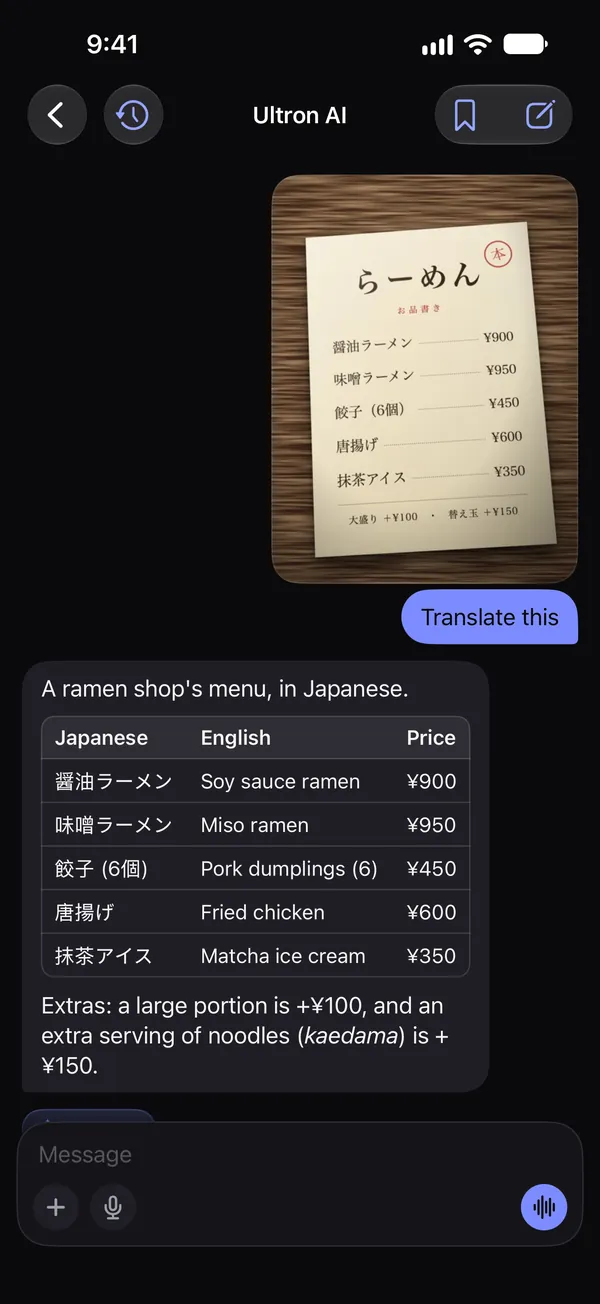
An AI menu translator for iPhone. Take a photo of a menu, a sign or a label, and Ultron translates it, prices and small print included, as a table you can read at the counter. Then ask what’s in a dish.
Translate this menu
 Free to try. No account needed.

How it works
Three taps.
Then ask.
No typing, no language to pick. The camera reads what it sees, and Ultron works out the rest.
Open Scan
From the home screen, a widget, Control Center, or ask Siri: “Scan with Ultron.”
Take the photo
A menu, a sign, a label, a page. The text is recognized on your iPhone, so small print and prices come through.
Translate, or ask
Translate it, have it explained, copy the text or look it up on the web. Then ask: “Which of these are vegetarian?”
Not just the words
What’s in it?
Just ask.
A translation tells you the name of the dish. Ultron tells you what it is, what’s in it, whether it’s spicy, and what it costs in your currency, because the photo stays in the conversation.
- Which ones have peanuts?
- What is natto?
- Is anything here vegan?
- How much is this in dollars?
- What would you order?
Two of them: the pad thai and the chicken satay, which comes with a peanut sauce. The green curry is made with cashews, and the papaya salad usually has peanuts on top, so ask them to leave it off.
Questions
Good to know.
Which languages can it translate?
Any language the camera can read, including Japanese, Chinese, Korean, Thai, Arabic and Cyrillic menus. The answer comes in the language your iPhone is set to; the app itself is in English, Spanish, Portuguese, German and French.
Does it work offline?
No. The text is recognized on your iPhone, then the photo and the text go through our server to OpenAI, which writes the translation. You need a connection, as with any translator that explains rather than matches words.
Is it free?
Every install includes 5 free messages, up to 3 of them camera scans, with no account to create. Ultron AI Premium removes the limit; the price is shown in the app before you buy.
What happens to the photo?
Nothing is sent until you choose what to do with it. Our server does not store the photo; OpenAI keeps it for up to 30 days to watch for abuse and does not train on it. The chat, with the photo, stays on your device. The Privacy Policy has the details.
Does it work on iPad?
Yes. On an iPad with a camera you scan the same way, and you can drop a photo of a menu into a chat as well.
Point at it.
Understand it.
Free to download, for iPhone and iPad with iOS 17 or later.